
WOOCOMMERCE TECHNICAL SEO CONSULTANT
WooCommerce Technical SEO Consultant for WordPress Stores
Technical SEO Help for WooCommerce Stores With Indexing, Speed, and Category Page Issues
WooCommerce is flexible. But that flexibility can also create technical SEO problems.
Plugins and themes can slow pages or change SEO output. Filters, tags, pagination, and search pages can duplicate URLs. Category visibility, canonicals, noindex rules, and migration or relaunch signals can suffer.
These issues can limit how Google crawls, understands, and ranks your store.
The goal is simple.
- Find what is holding the store back.
- Fix the issues that matter.
- Avoid wasting time on low-value SEO tasks.
As a WooCommerce technical SEO consultant, I help WordPress ecommerce stores find the technical issues that matter most. Then I turn those findings into clear next steps.
WHAT I REVIEW IN WOOCOMMERCE
01Category pages & indexation
02Filters, tags & pagination
03Noindex & canonicals
04Plugins & theme output
05Core Web Vitals
06Structured data & crawl signals
IS THIS SERVICE RIGHT FOR YOU?
A good fit if…
- You run a WooCommerce store.
- Important product or category pages are not indexed.
- Category pages lost traffic after a redesign or relaunch.
- Google Search Console shows indexing, crawl, canonical, or sitemap issues.
- Filters, tags, pagination, or search pages create duplicate or low-value URLs.
- Plugins or theme settings may be affecting SEO.
- Core Web Vitals or page speed issues affect important templates.
- Structured data is missing, broken, or duplicated.
- Your developer needs clear SEO instructions.
- You want WooCommerce technical SEO, not a generic SEO checklist.
This service is mainly for WooCommerce stores where organic search already matters, or where technical issues may be blocking better results.
This may not be the right fit if…
This is not a backlink campaign.
It is not a generic WooCommerce SEO checklist.
It is not a content calendar.
It is not a ranking guarantee.
PRICING AT A GLANCE
WooCommerce Technical SEO Services
Clear starting prices based on whether you need a focused diagnosis, a broader audit, or implementation support.
Full pricing and scope appears later on this page.
Focused Diagnostic
$500 fixed
One clearly defined WooCommerce technical SEO issue.
COMMON STARTING POINT
Technical SEO Audit
from $1,000
Broader diagnosis for multiple or unclear technical SEO issues.
Technical SEO Fix Sprint
from $1,500
A known issue that needs implementation and verification.
WOOCOMMERCE TECHNICAL SEO SCOPE
What I Check in a WooCommerce Store
The goal is not to collect every warning. The goal is to find the issues that can affect crawling, indexing, and organic visibility.
That includes sitemap signals, robots.txt access, crawl errors, and large-catalog crawl paths where relevant.
01Category Pages & Indexation
Category structure, important category-page signals, crawlability, and whether Google is indexing the commercial pages that should matter. I also check titles, headings, content, internal links, and template signals when products are indexed but categories stay weak.
02Filters, Tags & Pagination
Filters, tags, search pages, pagination, parameters, and other URL patterns that can create duplicate or low-value crawl paths.
03Noindex & Canonicals
Noindex settings, canonical tags, duplicate URLs, and conflicting signals that affect which WooCommerce pages Google should index. I also review WordPress, plugin, and settings behavior that can change those signals.
04Plugins & Theme Output
How WordPress plugins and theme code affect SEO output, templates, headings, internal links, schema, crawlability, and page performance.
05Core Web Vitals
LCP, INP, CLS, template speed, plugin load, scripts, images, tracking tools, page builders, and other performance blockers.
Explore Core Web Vitals Optimization →
06Structured Data & Crawl Architecture
Product, category, breadcrumb, review, price and availability schema, plus category depth, internal links, sitemap signals, and crawl paths for larger catalogs.
Redesign & relaunch signals
Redirects, old URLs, sitemap changes, canonicals, internal links, tracking, and template signals before or after a WooCommerce redesign, relaunch, theme change, or platform migration.
REAL WOOCOMMERCE RESULT
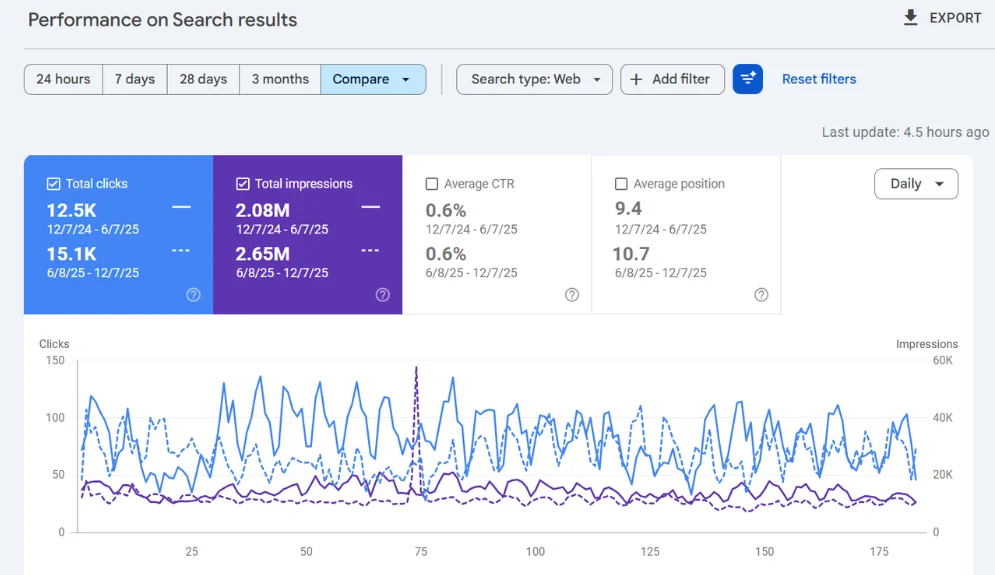
12.5K → 15.1K clicks
2.08M → 2.65M impressions
A WooCommerce store’s Google Search Console comparison shows organic clicks increasing from 12.5K to 15.1K and impressions increasing from 2.08M to 2.65M across the compared periods.
WHAT YOU GET
Clear Outputs Your Team Can Use
The goal is to make the problem clear. You should know what is wrong, why it matters, what should be fixed first, and how to move forward.
Findings & Evidence
Key technical issues, affected URLs, Google Search Console observations, crawl errors, and supporting evidence where useful.
WooCommerce-Specific Recommendations
Recommendations for categories, products, canonicals, noindex rules, filters, plugins/themes, Core Web Vitals, structured data, and other WooCommerce-specific issues.
Developer-Ready Guidance
Clear fix guidance your developer or internal team can act on, including WordPress, plugin, theme, and technical requirements where relevant.
Prioritized Action Plan
A prioritized plan showing what matters most, what can wait, and the right order for implementation.
HOW THE WORK MOVES FORWARD
01
Review
I review your WooCommerce store URL, your main SEO concern, and any available Google Search Console, Semrush, Screaming Frog, PageSpeed Insights, or developer notes.
02
Diagnose
I check the key WooCommerce technical SEO signals, including indexing, crawlability, category pages, canonicals, duplicate URLs, internal links, sitemaps, robots.txt, Core Web Vitals, structured data, plugins, themes, and redirects.
03
Prioritize
I separate findings by priority so high-impact blockers are addressed before low-value cleanup work.
04
Fix / Guide
I explain what should be fixed, why it matters, and how to approach it. Your developer or internal team can use the guidance, or I can support agreed implementation work.
05
Verify
After fixes go live, I can review the changes and check whether the issue was handled correctly.
Need a broader diagnosis?
If your WooCommerce store has several technical issues, an unclear traffic/indexing problem, or needs a full diagnosis, a Technical SEO Audit may be the better starting point.
FULL PRICING
WooCommerce Technical SEO Pricing
Choose the right level of support based on whether you need a focused diagnosis, a broader audit, implementation help, or ongoing technical SEO support.
Focused Technical SEO Diagnostic
Best fit: One clearly defined WooCommerce technical SEO problem that needs investigation and clear next steps.
Examples include a category indexing issue, a canonical or noindex problem, a duplicate URL pattern, a sitemap concern, or one specific plugin/theme-related SEO issue.
This is not a full-site WooCommerce technical SEO audit.
$500 fixed
WooCommerce Technical SEO Audit
Best fit: Multiple or unclear WooCommerce technical SEO issues that need broader diagnosis and prioritization.
Standard
$1,000 fixed
Large
$1,500 fixed
10,000+ URLs
from $2,000
Implementation is not included unless separately agreed.
WooCommerce Technical SEO Fix Sprint
Best fit: A known WooCommerce technical SEO issue that needs implementation support, QA, developer coordination where required, and verification.
Typically $1,500–$2,000, depending on the agreed technical scope and complexity.
from $1,500
Technical SEO Advisory
Best fit: WooCommerce stores with a developer or implementation team that need recurring technical SEO monitoring, diagnosis, prioritization, and review while their team implements the fixes.
Scope: One active technical SEO workstream at a time.
$1,500/month
Done-for-You Technical SEO
Best fit: Stores that want ongoing technical SEO support plus agreed hands-on SEO fixes, developer coordination, QA, re-crawls, and verification.
Scope: Up to two agreed technical SEO workstreams per month.
$2,500/month
Ongoing engagement: Initial engagement is 3 months, then month-to-month.
All prices are in USD and apply to one WooCommerce store unless stated otherwise.
SCOPE
WooCommerce technical SEO work focuses on issues that can affect crawling, indexing, site structure, speed, WordPress/WooCommerce output, and search engine access.
Included
- WooCommerce technical SEO diagnosis and analysis
- WooCommerce-specific recommendations
- Implementation guidance where included in the agreed scope
- QA / verification where included
- Developer-ready guidance
Not included
- Backlink campaign
- Generic WooCommerce SEO checklist
- Content calendar
- Ranking guarantee
Custom development, content production, backlink work, major migrations, and larger Core Web Vitals projects require separate scope where applicable.
A clear plan is more useful than a long list of warnings.
FREQUENTLY ASKED QUESTIONS